We get a lot of questions about the difference between Fan Version jerseys and Player Version jerseys. So, we put together a quick explanation to help you understand what sets them apart.
Adidas Player Version
The Adidas Player Version gives you the exact same jerseys worn on the field by professional players from Real Madrid, Juventus, Bayern Munich, Manchester United, Arsenal, and the brand’s other top clubs.
Key Features
• Performance Fit: Designed to fit snugly to the body, with hemlines that allow rapid movement without tugging or pulling. • Breathability: Incorporates Climachill technology with a mesh back panel to keep you cool and comfortable. • Lightweight Construction: Team crests and sponsor logos are heat-pressed, reducing weight compared to traditional embroidered versions.
Adidas Fan Version or Normal Jerseys
The Fan version, which professional players don’t wear but is the most popular choice among fans, offers a more relaxed fit with a straight hem—perfect for wearing in the stands or on the streets.
Key Features
• Relaxed Fit: While the Player version is built for performance and speed, the replica is designed for comfort. It’s looser and more forgiving. • Breathability: Features Climalite technology to wick away moisture, along with a mesh back panel for added comfort. • Embroidered Crests: Made for style, the Fan features fully embroidered team logos and sponsor details.
Nike Player Version (Vapor Match) Jerseys
Nike calls its Player Version jerseys Vapor Match, highlighting the advanced technology used in the same jerseys worn by pros on game day. These are sported by top clubs like FC Barcelona, Paris Saint-Germain, Chelsea, and others.
Key Features
• Slim Fit: Designed to follow your natural body shape and stretch in every direction for optimal movement. • VaporKnit Technology: At the cutting edge of performance, VaporKnit makes jerseys breathable, lightweight, and equipped with strategically placed mesh panels to increase airflow. • No Cling, Precision Fit: VaporKnit helps prevent the jersey from sticking to your skin, ensuring a comfortable and precise fit. • Heat-Pressed Logos: Like Adidas, Nike uses heat-pressed club and sponsor logos instead of embroidery to reduce weight and improve comfort.
Nike Fan Version (Stadium) Jerseys
Nike’s Fan jerseys, known as Stadium jerseys, are designed for fans—perfect for wearing at the stadium or on the streets, combining style and comfort.
key Features
• Dri-FIT Technology & Nike Breathe Fabric: Helps keep you dry, cool, and comfortable in any setting. • Sewn-On Badges: Features stitched club crests and sponsor logos, offering a classic, stylish look compared to the heat-pressed versions.
We recommend choosing the Player Version jerseys if you plan to wear them while playing football. Otherwise, we suggest the Fan Version (Normal Jerseys), which cost less and offer great comfort for everyday wear.
Before You Pick Your Size...
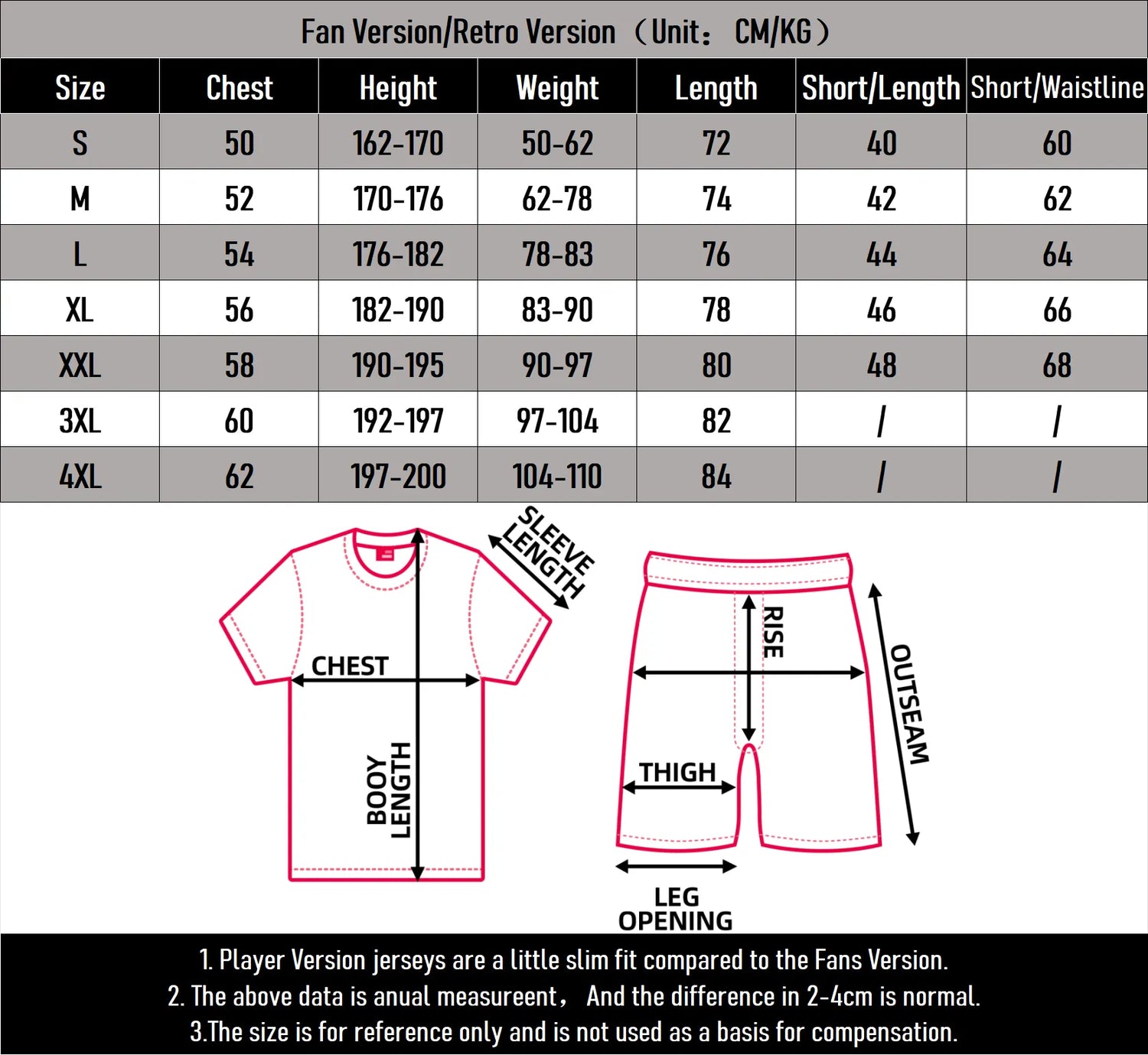
Our styles run a bit smaller than usual, so we recommend checking the size chart before placing your order to find your perfect fit!
Size Chart
Please refer to our size chart before placing your order to ensure the best fit. Measurements are approximate and may vary by 2–4 cm.
How to Care for Your Jersey
Soccer jerseys are delicate garments featuring embroidery and printed details, and should be handled with care. Do not machine wash, dry clean, or use bleach. We recommend gentle hand washing in cold water. Player Version jerseys are especially delicate and require extra care to preserve their quality and details.
Matchday Gear · Order Help
Where’s my order?
Follow your kit from our warehouse to your door — in four quick steps.
It starts with an email
Every order kicks off with an “Order confirmed” email from Matchday Gear. That email is your gateway to live tracking — here’s how to use it.
1
Step 1
Open your confirmation email
Right after you check out, we email you an “Order confirmed” message from Matchday Gear. Open it and tap View your order.
TipNo email in your inbox? Check your spam or junk folder — it sometimes lands there.
2
Step 2
Tap your tracking number
On your order page you’ll see a tracking number that starts with GV, listed next to “Other.” Tap it.
Tip“Track order with Shop” works too, but the GV number opens the most detailed view.
3
Step 3
Your tracking page opens
This takes you to the carrier’s tracking page. Your number is already filled in and your live status shows at the bottom — for example, In Transit to Next Facility.
4
Step 4
See your full delivery history
Tap the status bar to expand it. You’ll see every scan with dates and times — from Order received all the way to its latest location.
What your status means
The carrier updates your tracking as your parcel moves. Here’s the plain-English version.
Order received
We’ve handed your parcel to the carrier and it’s entered their network.
Gateway transit
Your parcel is passing through a sorting hub on its way to you.
In transit to next facility
It’s on the move between carrier facilities.
Out for delivery
It’s on the truck and arriving today.
Delivered
It’s arrived at your address.
Good to know
Most orders arrive within 8–20 calendar days of being placed.
Tracking can take a few days to show its first scan after you order — that’s completely normal.
Each order travels under one tracking number, even if it includes more than one item.
Still can’t find it?
Send us your order number and we’ll track it down for you.